
AI Image Fidelity vs. Price: A Designer’s Guide
Published on Tháng 1 20, 2026 by Admin
As a product designer, you embrace cutting-edge tools. AI image generators are therefore a powerful addition to your toolkit. They can create stunning visuals in seconds. However, this power comes with a cost. High-fidelity images often demand a higher price. This creates a critical challenge for designers.
You must balance the need for quality with the realities of a budget. This guide provides a clear path forward. Consequently, you will learn how to make smart, cost-effective decisions without sacrificing visual excellence. We will explore the factors that drive costs and offer practical strategies for optimization.
The Core Trade-Off: Quality vs. Cost in AI
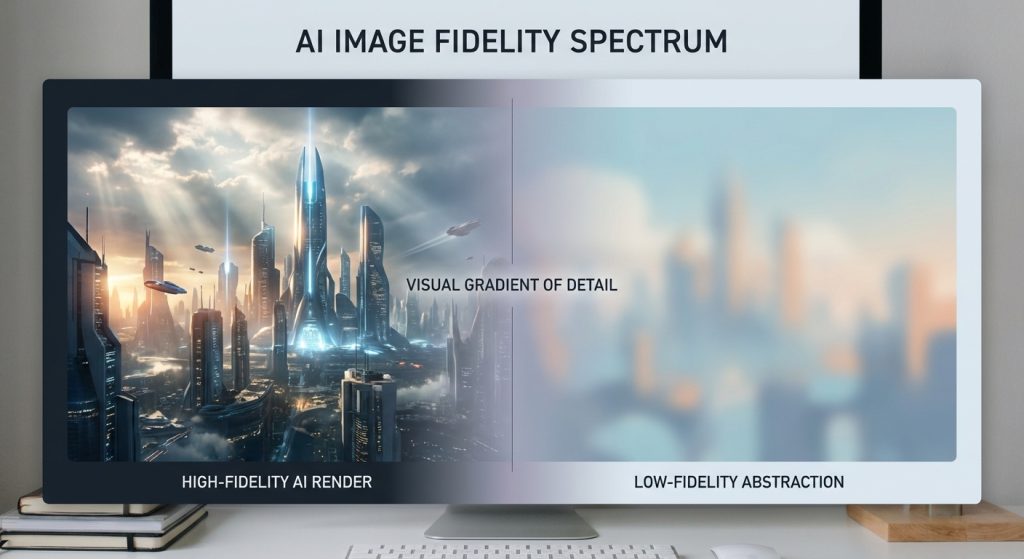
At its heart, the relationship between AI image quality and price is simple. Higher fidelity almost always costs more. This is because creating detailed, high-resolution images requires more computational power. Think of it like an artist spending more time on a detailed masterpiece versus a quick sketch.
For example, a simple icon might be cheap to generate. On the other hand, a photorealistic product render with complex lighting will be more expensive. As a result, every project requires a strategic choice. You must decide where your image falls on the spectrum between “good enough” and “pixel perfect.”
Understanding the Cost Drivers
Several key factors directly influence the price of an AI-generated image. Firstly, the complexity of the AI model plays a huge role. More advanced models produce better results but use more resources. Secondly, the image resolution is a major factor. A 4K image costs significantly more than a 1024×1024 pixel image.
In addition, the number of “steps” or iterations the AI takes to refine the image affects the price. More steps lead to more detail but increase computation time. Finally, even your prompt’s complexity can impact the final cost. Understanding these levers is the first step to controlling your budget.
Key Factors Influencing Generation Price
To truly master cost efficiency, you must dig deeper into what drives pricing. It’s not just about one single setting. Instead, a combination of choices determines the final cost of each image you create. Let’s break down the most important elements.
AI Model Selection
Not all AI image models are created equal. Some models, like DALL-E 3 or Midjourney’s latest version, are known for their high-quality, artistic output. However, they often operate on a credit or subscription basis that can be costly for high-volume work. These are your premium options.
On the other hand, open-source models like Stable Diffusion offer incredible flexibility. You can run them on your own hardware or use cheaper API services. While they might require more technical skill, the potential for savings is immense. Therefore, choosing the right model is a crucial first step. Your choice depends entirely on your project’s specific needs for quality and style. For a deeper analysis, it’s helpful to review a guide comparing cost metrics of different AI image models.
Image Resolution and Dimensions
Resolution is a straightforward cost factor. More pixels equal more work for the AI. Generating a small thumbnail is fast and cheap. In contrast, creating a large-format image for a print advertisement requires immense processing power and, therefore, costs more.
Always start by asking what the final use case is. If the image is for a small spot on a webpage, generating it at 4K resolution is wasteful. You can always generate smaller and use upscaling tools later if needed. This simple consideration can lead to significant savings over time.
Generation Steps and Iterations
Many AI models use an iterative process called “sampling steps” or “inference steps.” In simple terms, the AI starts with digital noise and refines it over a series of steps. A higher number of steps generally produces a cleaner, more detailed image. However, each step adds to the computational load.
You can often find a sweet spot. For instance, an image might look great at 30 steps, with little noticeable improvement at 50 steps. Experimenting with lower step counts for initial drafts is a smart strategy. This allows you to explore concepts cheaply before committing to a final, high-step render.
Aspect Ratios and Composition
Even the shape of your image can influence its price. Some AI models are optimized for standard aspect ratios, like 1:1 (square) or 16:9 (widescreen). Generating images in non-standard or extreme panoramic formats can sometimes increase the computational resources needed.
This happens because the model may have to work harder to fill the unusual space coherently. As a result, it’s wise to understand how aspect ratios impact your image pricing before starting a project. Sticking to common formats during the drafting phase can help keep initial costs low.
Practical Strategies for Balancing Fidelity and Price
Knowing the factors that drive cost is one thing. Applying that knowledge is another. Fortunately, you can use several practical strategies to get the visuals you need without overspending. These techniques focus on working smarter, not just cheaper.
Start with Low-Fidelity Drafts
You don’t need a perfect image on the first try. In fact, it’s more efficient to start with low-cost, low-fidelity drafts. Use a faster, cheaper model or lower your settings for resolution and steps. The goal is to quickly explore different concepts and compositions.
This approach allows you to fail fast and cheap. You can generate dozens of ideas without worrying about the budget. Once you and your team agree on a direction, you can then invest in a single, high-fidelity version of the chosen concept.
Master Prompt Engineering
The quality of your input directly affects the quality of your output. A vague prompt will lead to generic, often unusable images. This forces you to generate again and again, wasting both time and money. Therefore, learning to write detailed, specific prompts is a critical skill.
Include details about subject, style, lighting, color, and composition. Use negative prompts to exclude elements you don’t want. A well-crafted prompt gets you closer to your desired result on the first try, dramatically reducing the number of costly iterations.
Leverage Post-Generation Upscaling
Generating images at their final, massive resolution can be expensive. A more cost-effective workflow is to generate at a smaller size and then use a dedicated AI upscaler. These tools are specifically designed to increase resolution while adding detail and maintaining clarity.
For example, you could generate a 1024×1024 image for a low price. Then, you can use an upscaling service to intelligently enlarge it to 4K. This two-step process is often much cheaper than generating a native 4K image from the start.
Choose the Right Tool for the Job
The most expensive, high-end model isn’t always the best choice. For simple graphics, icons, or abstract backgrounds, a less powerful but cheaper model might be perfectly adequate. Overspending on fidelity for assets that don’t require it is a common mistake.
Build a small portfolio of different AI tools. Know their strengths, weaknesses, and costs. Consequently, you can select the most appropriate and cost-effective tool for each specific task in your design workflow. This strategic selection is key to long-term budget management.
Frequently Asked Questions
What is the cheapest way to get high-quality AI images?
The most affordable method is often a multi-step process. First, use an open-source model like Stable Diffusion for initial generation, which can be very low-cost. Then, take your best result and use a dedicated AI upscaling tool to increase its resolution and fidelity. This combination avoids the high cost of native high-resolution generation.
Does image complexity directly affect the price?
Yes, absolutely. An image with many subjects, intricate details, and complex lighting requires more computational work from the AI. A simple prompt for a “blue sphere on a white background” will almost always be cheaper to generate than a “photorealistic scene of a bustling medieval market at sunset.” Therefore, simpler concepts are generally more cost-effective.
Should I use free AI image generators for professional work?
You can, but with caution. Free tools are excellent for ideation and creating rough drafts. However, they often have limitations on resolution, usage rights, and may include watermarks. For final, client-facing assets, it is usually better to use a paid service that offers clear commercial licensing and high-quality, unwatermarked outputs.
